Mountain Duck Alternatives for Mac in 2026: 5 Ways to Mount SFTP, FTP and S3 in Finder
We compared Mountain Duck with ExpanDrive, CloudMounter, Transmit, rclone and our own ZyDisk: prices, protocols, whether you need macFUSE, and which one fits which kind of work. Prices checked on the vendors' own sites in November 2026.
On this page
Mountain Duck is the app most people find first when they want a server or an S3 bucket to show up in Finder like a disk. It is good at that, but it is not free, and it is not the only way to do it any more. Some of the alternatives cost nothing, some work on Windows and Linux too, and one of them still asks you to install macFUSE.
We make one of these apps ourselves, ZyDisk, so take our view with that in mind. We have tried to be fair: every price and requirement below comes from the vendor's own website or documentation, checked on November 27, 2026, and we say plainly where the other apps do better than ours.
What "mounting in Finder" can mean#
These apps all put your remote files in Finder, but not in the same way, and the difference matters more than the feature lists suggest. There are three approaches on a modern Mac:
| Approach | How it shows up | Used by |
|---|---|---|
| File Provider (Apple's framework, the one iCloud Drive and Dropbox use) | A location in Finder's sidebar, stored under ~/Library/CloudStorage. Files download when you open them. | ExpanDrive, CloudMounter ("macOS Native Drive"), Mountain Duck's Integrated mode |
| Network volume | A drive under /Volumes, like a USB disk or a file server. Apps read and write the server through it. | Mountain Duck's Online and Smart Synchronization modes, CloudMounter's "Network Drive", rclone, ZyDisk |
| macFUSE | Also a drive under /Volumes, served by a file system extension | Transmit, CloudMounter's "macFuse Drive", sshfs |
File Provider feels like iCloud Drive: placeholders, on-demand downloads and offline copies. That is great for documents and photos. A network volume feels like a disk, which tools such as Terminal, Git and code editors usually expect.
macFUSE is the old route. By default it loads a kernel extension, and on Apple silicon that means restarting into Recovery and lowering your Mac's security settings. We explained why, and how to avoid it, in How to Mount SFTP as a Drive in Finder on Mac, Without macFUSE.
The comparison table#
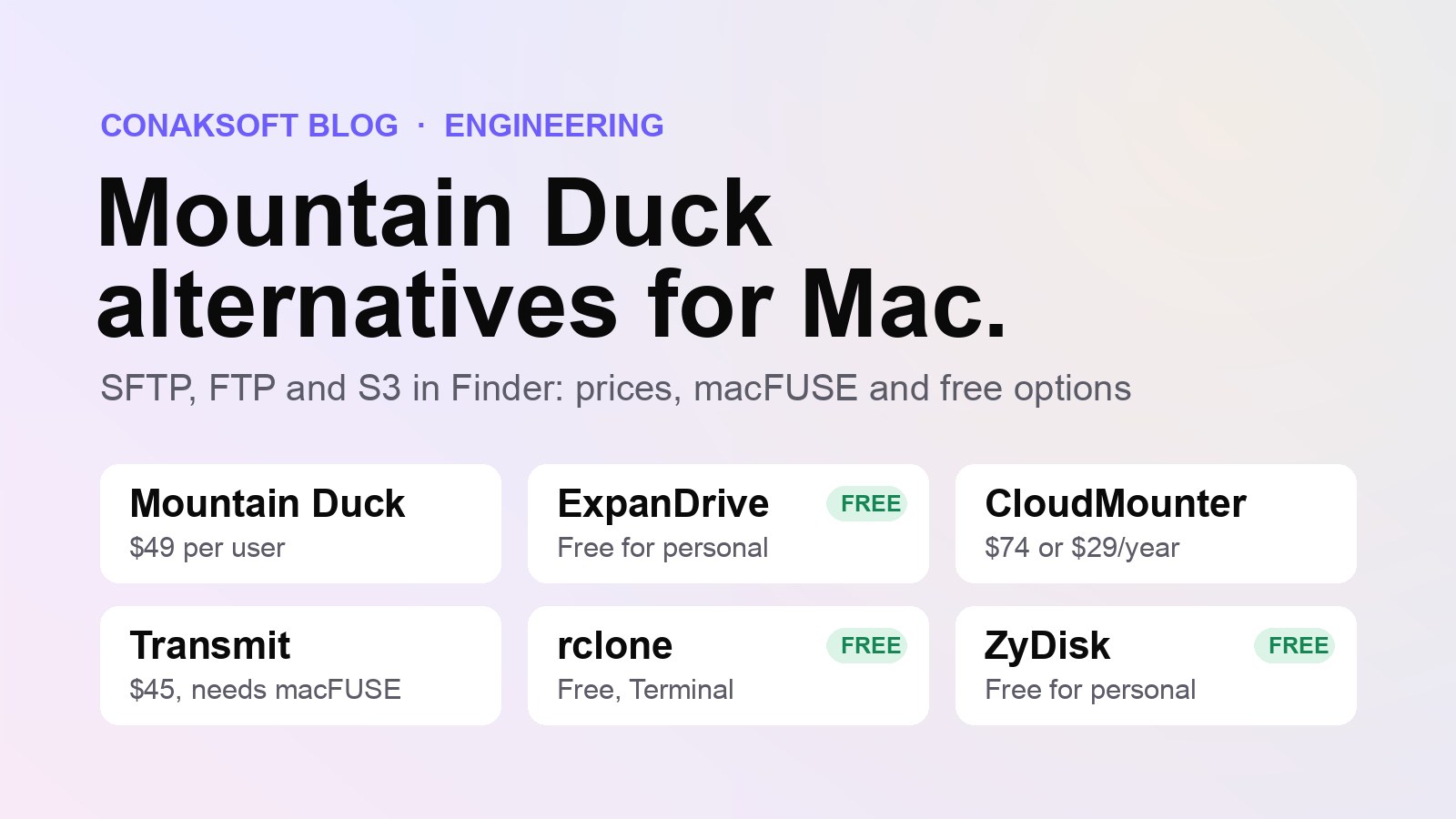
| Mountain Duck 5 | ExpanDrive | CloudMounter | Transmit 5 | rclone nfsmount | ZyDisk | |
|---|---|---|---|---|---|---|
| Price | $49 per user | Free up to 10 users | $74 once or $29/year | $45 once | Free | Free for personal use |
| Free plan covers SFTP, FTP and S3 | ✗ (14-day trial) | ✓ | ✗ | ✗ (7-day trial) | ✓ | ✓ |
| SFTP | ✓ | ✓ | ✓ | ✓ | ✓ | ✓ |
| FTP | ✓ | ✓ | ✓ | ✓ | ✓ | ✓ (and FTPS) |
| S3 and S3-compatible | ✓ | ✓ | ✓ | ✓ | ✓ | ✓ |
| Google Drive, Dropbox, OneDrive | ✓ | ✓ | ✓ | ✗ (in the app only) | ✓ | ✗ |
| Needs macFUSE | No | No | Optional | Yes | No | No |
| Mount type | Network volume or File Provider | File Provider | File Provider, macFUSE or network | macFUSE | Network volume (NFS) | Network volume (NFS) |
| Offline files | ✓ (Smart Sync, Integrated) | ✓ | ✓ (Native Drive) | ✗ | ✗ | ✗ |
| Minimum macOS | 13 | 11 | 12.4 | 13 | Any recent | 13 |
| Windows | ✓ | ✓ (and Linux) | ✓ | ✗ | ✓ (and Linux) | ✗ |
| How you install it | Download or Mac App Store | Download | Download or Mac App Store | Download or Mac App Store | Homebrew or rclone.org | Download from GitHub |
A few details that don't fit in a table:
- ZyDisk has no paid tier and no locked features: everything is free for personal, study and non-profit use. Using it at work needs a commercial license from us.
- ExpanDrive's Business plan, for more than 10 users, is $29 a month.
- Mountain Duck's license covers one person on any number of computers, but only for one major version. Upgrades to the next version are discounted, not free.
- CloudMounter has a free plan, but it only covers one Google Drive, Dropbox and OneDrive account each. Other services, including SFTP, FTP, S3 and WebDAV, need a paid plan. Its macFUSE mode is not available in the Mac App Store edition.
- ExpanDrive's free tier explicitly allows commercial use up to 10 users or devices, which is unusual and generous.
- Transmit lists Google Drive, Dropbox and other clouds, but its Finder mounting covers FTP, SFTP, S3 and WebDAV.
Mountain Duck: the one to beat#
Mountain Duck comes from the team behind Cyberduck, and it shows. There is no free plan: after a 14-day trial you need a license. It supports the longest list of services here, from SFTP, FTP and WebDAV to S3, Backblaze B2, Azure, Google Drive, OneDrive, SharePoint and Dropbox. Version 5 added an Integrated mode built on File Provider, next to the older Online and Smart Synchronization modes that mount a network volume. Smart Synchronization keeps a local cache, so recently used files open even without a connection.
One thing to check before you rely on Integrated mode: Mountain Duck's own documentation lists it as unsupported for FTP and S3. Those protocols work in the other two modes.
Pick it if you want one paid tool for every service you use, on both Mac and Windows, with offline access. Skip it if $49 per major version is more than the job is worth to you.
ExpanDrive: the free one#
ExpanDrive has been around since 2004 and is now owned by Files.com. On the Mac it uses File Provider, so your drives live under ~/Library/CloudStorage and appear in Finder's sidebar. It supports 15 services, including SFTP, FTP, WebDAV, S3, Wasabi, Backblaze B2, Google Drive, OneDrive and Dropbox, with an offline cache.
It is free with no trial timer for personal use and for teams of up to 10 users or devices, commercial use included. It runs on macOS 11 and later, Windows and Linux.
Pick it if you want a free, polished app and File Provider's iCloud-style behaviour suits you. Skip it if you want drives under /Volumes that behave like a disk, for example for Terminal scripts that expect a fixed path.
CloudMounter: lifetime license, encryption#
CloudMounter from Electronic Team mounts Dropbox, OneDrive, Google Drive, S3, Backblaze, pCloud, MEGA, OpenStack, WebDAV, SFTP and FTP. It is unusual in letting you choose how each drive is mounted: its recommended "macOS Native Drive" uses File Provider with offline support, "macFuse Drive" uses macFUSE, and "Network Drive" needs no extra components. Its site also advertises AES-256 encryption for files you store in the cloud.
The Mac version costs $29 a year or $74 once, for one Mac and personal use, and needs macOS 12.4 or later. After a free trial it drops to a free plan that keeps one Google Drive, Dropbox and OneDrive account working, while other services, servers included, become read-only.
Pick it if you mostly mount consumer clouds and like paying once. Skip it if you need it at work, since both personal plans exclude that, or if you only want SFTP for free.
Transmit 5: if you already own it#
Transmit is Panic's well-loved file transfer app, $45 once after a 7-day trial, macOS 13 or later. It is mainly a two-pane transfer window, not a mounting tool. It can mount FTP, SFTP, S3 and WebDAV servers in Finder, but Panic's help page says you need FUSE for macOS (macFUSE) for that, including approving its system extension. Panic's own Transmit Disk feature was retired in version 5.6.
Pick it if you already use Transmit for transfers and only mount a server now and then. Skip it if you don't want macFUSE on your Mac.
rclone nfsmount: free, in Terminal#
rclone is the open-source Swiss army knife of cloud storage. Its nfsmount command mounts any of its many backends, SFTP, FTP, S3, Google Drive and dozens more, as a network volume using macOS's built-in NFS client. No macFUSE, no app, no cost:
rclone nfsmount myserver:/var/www ~/Servers/myserver --vfs-cache-mode fullThe trade-off is that you manage everything yourself: remotes, caching flags, keeping it running, and the ._ files macOS leaves on your server. Our step-by-step guide covers the details we learned the hard way.
Pick it if you live in Terminal and want something free and scriptable. Skip it if you want a menu bar app that someone else maintains.
ZyDisk: our own, for developers#
We built ZyDisk because we wanted rclone's approach without the Terminal work, for the servers we deploy to every day. This website is published through a ZyDisk drive. Here is what it does, taken from its source code rather than our marketing:
- Mounting: for each drive it starts
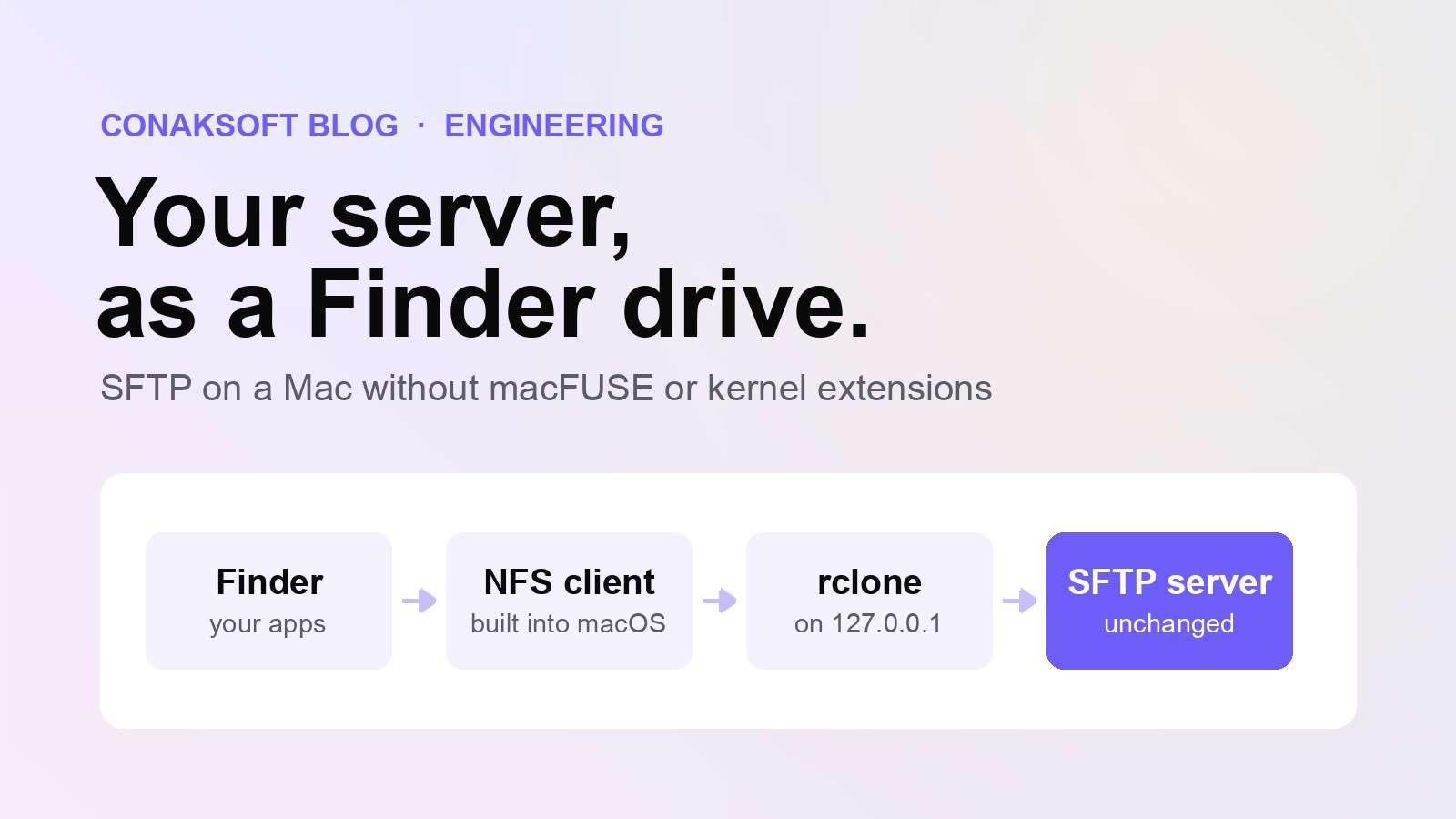
rclone serve nfson 127.0.0.1 and mounts it under/Volumeswith macOS's ownmount_nfs. No macFUSE, no kernel extension, no File Provider. - Protocols: SFTP (password or SSH key), FTP, FTPS and any S3-compatible service with a custom endpoint, such as AWS S3, Cloudflare R2, MinIO, Wasabi and Backblaze B2.
- Writes: files are cached locally (up to 2 GB, kept for 24 hours) and uploaded about 3 seconds after you save. The app shows each drive's upload queue, and if you eject while uploads are pending, they still finish in the background.
- Passwords: kept in the macOS Keychain and passed to rclone through its environment, never written to a config file or shown on a command line.
- The
._problem: macOS writes._and.DS_Storefiles to network drives. ZyDisk deletes them from the server as they arrive, and can sweep old ones. - Admin prompts: a small helper is installed once with your approval. It can only mount and unmount ZyDisk's own local drives, and after that connecting never asks for your Mac password.
- Privacy: no telemetry or analytics. Connection details stay on your Mac.
- Price: every feature is free for personal use. There is no Pro version, trial or locked feature.
- Install: a universal app for Apple silicon and Intel, signed with our Developer ID and notarized by Apple, from GitHub releases.
Where the others are ahead, honestly:
- Fewer services. No Google Drive, Dropbox, OneDrive or WebDAV.
- No offline mode and no Windows version.
- License: ZyDisk is source available under the PolyForm Noncommercial license. That makes it free for personal use, study and non-profits, but not open source in the strict sense, and using it at work needs a commercial license from us. ExpanDrive is free at work for up to 10 people.
Pick it if you mostly work with SFTP or S3 servers, want them as plain /Volumes drives, care about where your passwords go, and like being able to read the code. Skip it if you need consumer clouds, offline files or Windows.
Which one should you use?#
| If you want... | Use |
|---|---|
| Free, polished, also on Windows and Linux | ExpanDrive |
| Every cloud and server in one paid app, with offline files | Mountain Duck |
| A lifetime license for personal clouds | CloudMounter |
| Occasional mounts from an app you already own | Transmit (with macFUSE) |
| Free and scriptable, no GUI | rclone nfsmount |
SFTP and S3 servers as /Volumes drives, readable source, no telemetry | ZyDisk |
If you are unsure, start with a free option. ExpanDrive, rclone and ZyDisk give you every feature for free for personal use. Mountain Duck, CloudMounter and Transmit have free trials, but their SFTP, FTP and S3 support is paid after that.
Frequently asked questions#
Is there a free alternative to Mountain Duck for Mac?
Yes. ExpanDrive is free for personal use and for teams of up to 10 users. rclone's nfsmount command is free and open source. ZyDisk is free for personal and non-profit use, with every feature included. CloudMounter also has a free plan, but it does not include SFTP, FTP or S3.
Which of these need macFUSE? Transmit does, for its Finder mounting. CloudMounter offers it as one of three options. Mountain Duck, ExpanDrive, rclone nfsmount and ZyDisk work without it.
Can I mount an S3 bucket as a drive on a Mac? Yes, with any app in the table. For S3-compatible services such as Cloudflare R2, MinIO or Wasabi, check that the app lets you enter a custom endpoint. ZyDisk, rclone and Mountain Duck do.
Is there an open-source Mountain Duck alternative? rclone is fully open source (MIT license). ZyDisk's source code is public, but its license does not allow commercial use without a separate license, so it is source available rather than open source.
Why do I see ._ files on my server after using a mounted drive?
macOS stores extended attributes in hidden ._ files on volumes that can't keep them, and Finder adds .DS_Store to folders. Any network mount can leave them behind. You can delete them with rclone delete and --include '._*', or let ZyDisk remove them automatically.
If you need a Mac app, a website or a mobile app built by people who use these tools every day, tell us about your project.
Sources (all checked on November 27, 2026)
- Mountain Duck, Buy, Licensing (14-day trial), Installation and system requirements and Connect mode
- ExpanDrive, Pricing, Download and ExpanDrive for Mac
- CloudMounter, Mac App Store listing (free plan and subscription services), General info (trial and free version), Purchase, Home page and Types of drive mounting
- Panic, Transmit 5 and Installing FUSE for macOS
- rclone, rclone nfsmount and license
- ZyDisk, source code, README and releases, version 1.1.0